DaringFX is now a free
webcam effects app for Mac.
The video effects I built for Premiere Pro now run live on your camera and voice. DaringFX hands the result to any meeting app as a virtual camera and a virtual microphone, and it is free.
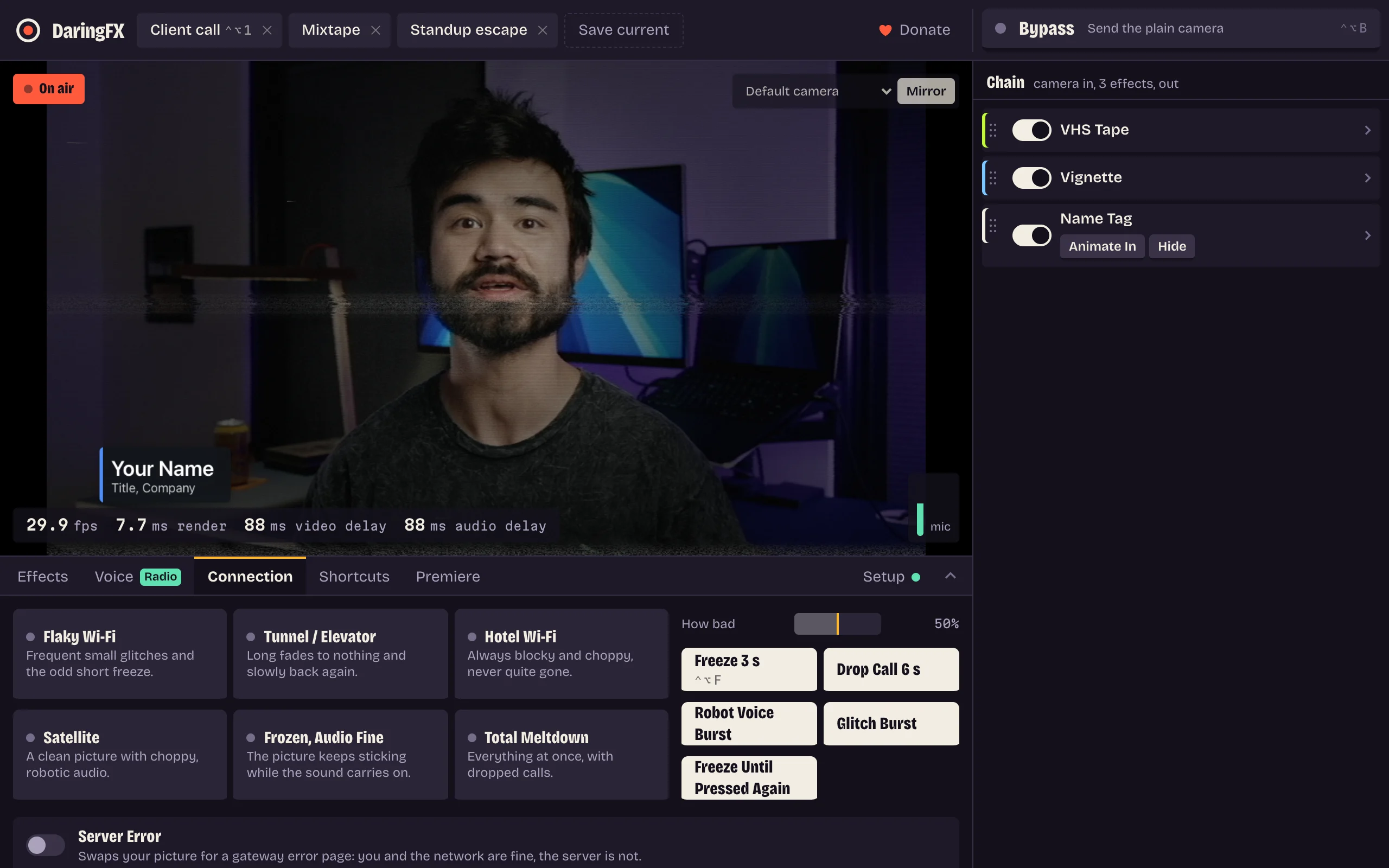
DaringFX began as a set of glitch effects for Premiere Pro and After Effects: datamosh, pixel sorting, subject masks and effects driven by gyro data. The DaringFX project page covers that side. This month it grew a second job. The same kinds of effects now run on a live camera, so they work in a meeting instead of only in an edit.
A Virtual Camera and Microphone for Zoom, Meet and FaceTime
DaringFX takes your real camera and microphone, puts effects on them, and offers the result to other apps as a camera called DaringFX Camera and a microphone called DaringFX Mic. You pick those two in your meeting app and everyone sees and hears the effected version. Any meeting app that lets you choose its camera and microphone will work.
Effects stack in a chain, each with its own controls. You can save a chain as a preset, give it a global keyboard shortcut and reach it from the menu bar. A Bypass switch sends your plain camera at once, for the moment a client joins early.
129 Live Webcam Effects in Ten Groups
Film looks and grading: film stocks, black and white, day for night, skin smoothing and LUTs.
Optics: halation, film grain, lens flare, tilt shift, bokeh blur and kaleidoscope.
Illustration looks: toon ink, pencil sketch, halftone print, oil paint and stained glass.
Retro: VHS tape, CRT monitor, dither, ASCII, night vision and photocopy.
Glitch: channel shift, pixel sort, JPEG crush, interlace tear and pixel melt.
Background: blur, replace, green screen, duotone, people outline and spotlight.
Time: echo trails, slit scan, stutter, datamosh and time grid.
Meeting tools: Auto Frame, a name tag, be right back, loop me, a clock and low light.
A fake bad connection: six presets from Flaky Wi-Fi to Total Meltdown, plus Server Error.
Comedy: googly eyes, big head, shades, mustache, deep fry, dramatic zoom and confetti.
Auto Frame is the practical one. It follows your face and shoulders like a camera operator would, and widens when a second person joins you.
A Fake Bad Connection for When You Need to Leave
This is the silly one. Pick how your call falls apart: Flaky Wi-Fi, Tunnel / Elevator, Hotel Wi-Fi, Satellite, Frozen with the audio fine, or Total Meltdown, with a slider for how bad it gets. Five momentary triggers, such as Freeze 3 s and Drop Call 6 s, fire on a button or a shortcut.
The picture and the sound fail together, which is what makes it believable. A freeze on screen comes with the matching dropout in your voice. Server Error goes one step further and swaps your picture for a gateway error page that blames the server, so you and the network are fine and the meeting software is not.
15 Voice Effects, Kept in Step With the Picture
The voice side runs from Broadcast Voice, which cleans up your own voice, to Robot, Helium, Cathedral and Underwater. Heavy camera effects take a few frames to render, so the app delays the sound slightly to match. Your lips and your voice stay together even with a long chain on the camera.
How It Works: Swift, Metal and a Camera Extension
The app is four parts that agree on one written contract:
An engine in Swift. It captures the camera, asks Apple Vision for the person mask, faces, bodies and hands, then runs the effect chain as Metal compute shaders. It has no interface of its own.
A camera extension. A CoreMediaIO system extension is what macOS lists as DaringFX Camera. It relays the frames the engine pushes to it, at 1280 by 720 and 30 frames per second.
A Tauri shell with a Vue interface. Rust starts the engine, holds the state and handles shortcuts and the menu bar item. The interface is Vue and Tailwind CSS. It talks to the engine in lines of JSON.
A loopback audio driver. DaringFX Mic is built from BlackHole, an open source driver by Existential Audio.
Three decisions made it usable in a real meeting:
Video never touches the web view. Frames go from the engine straight to the camera extension. The window only shows a preview, so you can close it and the camera keeps running.
A steady delay beats a short one. Vision and the effect chain run as two overlapping stages, so the frame rate holds as long as each stage fits in a frame. Adding an effect does not stall the picture, and heavy chains hold 30 frames per second. The delay that remains is constant, and the audio is delayed by the same amount.
One timeline drives the fake connection. The video path and the audio path both ask the same clock what the connection is doing at the moment each frame or sound buffer was captured. That is why a freeze and its dropout land together.
Many of the camera effects are ports of the Premiere plugins. The maths in each shader stayed the same. What changed is the plumbing around it: textures instead of Premiere's raw buffers, and defaults retuned so an effect looks right on a webcam picture the moment you add it.
One Free App, No Account and No Watermark
DaringFX used to have a licence key, a watermark and a separate installer. All three are gone. It is one free Mac app with no account and no paid tier, and a Donate button if it earns its keep.
The same app installs the 95 effects and transitions for Premiere Pro and After Effects and keeps them up to date. It checks the signature on each plugin before it installs it, and the app updates itself in the background.
What You Need and What Is Still Rough
A Mac with Apple silicon, on macOS 14 or later.
A few minutes for setup. macOS asks you to approve the virtual camera yourself in System Settings, and nothing is installed until you press the buttons.
The voice effects and the virtual microphone have had little live testing so far.
Halation, Anamorphic Streaks, Star Glints and the automatic Lens Flare need a bright light in frame to show.
Face props placed after an effect that moves the whole picture, such as Spin or Big Head, do not follow it yet.
It is an early, experimental version, built with the help of AI coding tools. Expect rough edges, and please report what breaks.
Download DaringFX
The app and the setup steps are on the DaringFX download page, and the live camera page shows more of the effects in motion.
129
live camera effects in ten groups
15
voice effects, delayed to match the picture
$0
no account, licence key or watermark
Let's Talk
Have an idea for a desktop app, a web app or a tool that does not exist yet? Reach out and I will help you think it through.